Braintree
ProsperStack integrates with Braintree to import customer and subscription data, personalize retention experiences and apply supported subscription changes. This page explains how to connect and integrate Braintree and summarizes the features and properties supported by the platform integration.
Connecting Braintree
To connect Braintree, you'll need your Braintree merchant ID, public key and private key.
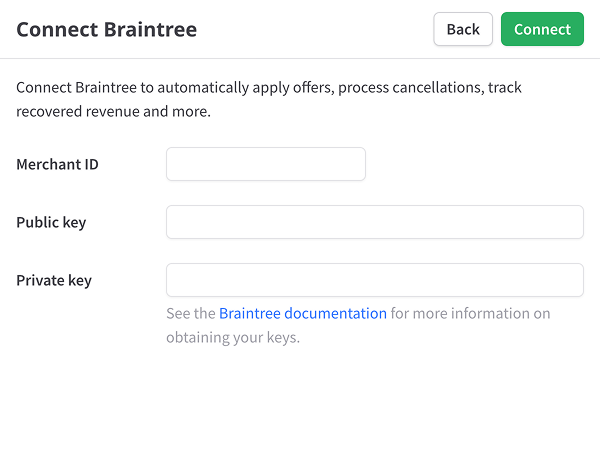
Merchant ID — Your merchant ID uniquely identifies your Braintree account.
Public key — Your user-specific Braintree public identifier.
Private key — Your user-specific Braintree private identifier.
For more information on retrieving your Braintree credentials, see the Braintree documentation.
After clicking Connect, the import process will begin automatically.
Integrating Braintree
There are two ways to direct your customers to your ProsperStack cancellation flow:
-
JavaScript embed - Embed the ProsperStack cancellation flow in your application or website for a seamless, in-app experience. This option uses the ProsperStack JavaScript library to start a flow for the customer's subscription.
-
Customer portal - Use the hosted customer portal to integrate without writing code. Customers follow a link to the portal, verify their email address and select a subscription to manage.
Feature support reference
Solutions
Overall support for ProsperStack solutions.
Features
Subscription platform dependent capabilities. Features supported on every platform are not listed.
Coupons
- Coupon offer
- Create new coupon
- Percentage-based coupon
- Fixed amount coupon
- One-time coupon
- Indefinite coupon
- Monthly duration coupon
- Billing cycle coupon
- Custom duration coupon
- Use existing coupon
- Apply coupon to customer
- Apply coupon to items
- Replace existing coupon
- End trial (conversion)
Plan changes
- Plan change offer
- Change billing frequency
- Disable proration on immediate changes
- Change plan at end of billing period
- Apply coupon with plan change
- Remove add-ons with plan change
- Reset billing date with plan change
Upgrade
- Upgrade offer
Downgrade
- Downgrade offer
Modify subscription
- Modify subscription offer
Pause subscription
- Pause subscription offer
Trial extension
- Trial extension offer
Product swap
- Product swap offer
Other offers
- Payment recovery offer
- Free gift offer
- One-time purchase offer
- Reactivation offer
- Reschedule order offer
Subscription cancellation
- Subscription cancellation
- Cancel at end of billing period
- Cancel unpaid invoices
Customer portal
- Customer portal
- Update billing information
- Email login
- View invoices
Properties
Properties available for customer segmentation.
Subscriber18
- Active offer ID
- ARR
- Cancel reason
- Cancel reason code
- Days since saved
- Email address
- First name
- Last name
- Last session date
- Last session start date
- LTV
- MRR
- Paid invoices
- Saved date
- Session domain
- Session URL
- Status
- Subscription plan IDs
Subscription18
- Active coupon ID
- ARR
- Cancel reason
- Cancel reason code
- Discount fixed amount
- Duration (days)
- Is free trial
- Is past due
- Last session date
- Last session start date
- LTV
- MRR
- Next billing date
- Paid invoices
- Session domain
- Session URL
- Status
- Will renew
Plans5
- Plan IDs
- Plan interval counts
- Plan intervals
- Plan names
- Plan quantities