Naviga
ProsperStack integrates with Naviga to import subscriber and subscription data, personalize retention experiences and apply supported subscription changes. This page explains how to connect and integrate Naviga and summarizes the features and properties supported by the platform integration.
Connecting Naviga
Naviga Subscribe is self-hosted or deployed as a single-tenant cloud instance. Because Naviga configures each instance for the publisher, setup varies between implementations and requires coordination with Naviga. ProsperStack will work with you and Naviga throughout the process.
To connect Naviga, you'll need your Naviga endpoint, media group code, token and NCS Circ billing endpoint. Ask Naviga for the connection details for both your production and deploy environments. Use the deploy environment details in ProsperStack test mode.
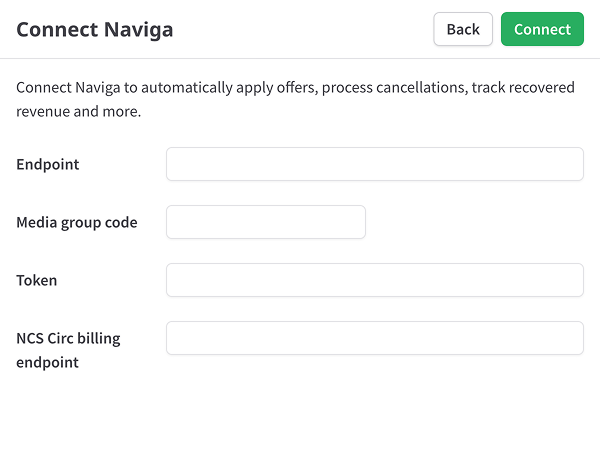
After clicking Connect, the import process will begin automatically.
Enabling offer groups for external platforms
Before you can use Naviga offer groups in ProsperStack, you'll need to make them available to external platforms.
In SolCon, open Offer Groups and select an offer group you want to use for a downgrade. Under Additional options, enable ExternalSalesPlatforms. Repeat this for each offer group you want to make available in ProsperStack. Offer groups without this setting won't be visible in ProsperStack.
Integrating Naviga
When you're ready to launch, ask Naviga to add ProsperStack to your My Account pages. Customers won't enter the cancellation flow until this integration is in place.
Enable each publication's domain
Enable the domain in ProsperStack for each publication you're launching. If you're launching multiple publications, you can enable their domains in stages.
Additional steps
Because every Naviga deployment is configured differently, setup may uncover environment-specific requirements beyond the steps above. These commonly include:
- Web application firewall (WAF) rules and IP allowlisting
- Sync timing between your backend circulation system and Naviga Subscribe
- Business rules that determine when the cancellation option appears
- Differences between Naviga releases
ProsperStack will work with you and Naviga to identify and resolve these requirements as they arise.
Feature support reference
Solutions
Overall support for ProsperStack solutions.
Features
Subscription platform dependent capabilities. Features supported on every platform are not listed.
Coupons
- Coupon offer
Plan changes
- Plan change offer
Upgrade
- Upgrade offer
- Upgrade at end of billing period
Downgrade
- Downgrade offer
- Downgrade at end of billing period
Modify subscription
- Modify subscription offer
Pause subscription
- Pause subscription offer
- Specify pause length
- Pause for a period of time
- Pause for a number of billing cycles
- Pause indefinitely
- Pause at end of billing period
- Reset billing date after pause
- Specify pause end date
Trial extension
- Trial extension offer
Product swap
- Product swap offer
Other offers
- Payment recovery offer
- Free gift offer
- One-time purchase offer
- Reactivation offer
- Reschedule order offer
Subscription cancellation
- Subscription cancellation
- Cancel at end of billing period
- Cancel unpaid invoices
Customer portal
- Customer portal
Properties
Properties available for customer segmentation.
Subscriber19
- Active offer ID
- ARR
- Cancel reason
- Cancel reason code
- Days since saved
- Email address
- First name
- Last name
- Last session date
- Last session start date
- LTV
- MRR
- Paid invoices
- Saved date
- Session domain
- Session URL
- Status
- Subscription plan IDs
- WRR
Subscription41
- Active coupon ID
- App store
- ARR
- Auto renew interval
- Auto renew interval count
- Billing location
- Billing ZIP
- Cancel reason
- Cancel reason code
- Code
- Current balance
- Delivery route
- Delivery ZIP
- Digital distribution day
- Duration (days)
- Is auto renew
- Is digital
- Is EZPay
- Is free trial
- Is past due
- Is print
- Last payment amount
- Last session date
- Last session start date
- LTV
- MRR
- Next billing date
- Paid invoices
- Paper code
- Paper name
- Plan prices
- Print distribution day
- Rate code
- Service type
- Session domain
- Session URL
- Start source
- Status
- Stop date
- Will renew
- WRR
Plans5
- Plan IDs
- Plan interval counts
- Plan intervals
- Plan names
- Plan quantities