How retained revenue is counted
Retained revenue is the total of the payments ProsperStack counts as saved or deflected. It's a sum of payments, so it won't match the MRR or ARR on the dashboard's Recurring revenue card.
Retained revenue is shown on the retention dashboard and in the retained revenue trends and retained revenue details reports, where Total recovered is saved and deflected revenue combined. It isn't available with a custom integration.

Only paid invoices count. Free invoices and invoices imported from your platform's history are left out. Amounts are converted to your account's currency.
Saved revenue
When a subscriber accepts a retention offer in the cancellation flow or from an offer link, subsequent payments are credited as saved revenue until the subscriber cancels.
If the subscriber had accepted another offer previously, the payment is credited to the most recently accepted offer.
If the subscriber later accepts a reactivation, conversion or payment recovery offer, payments after that count toward that offer instead and aren't included in retained revenue.
By subscriber or by subscription
The Retained revenue tracking setting in general settings decides which subscriptions a save covers. With By subscriber (the default), a save covers all of the subscriber's subscriptions, including new ones. With By subscription, it only covers the subscription that was saved.
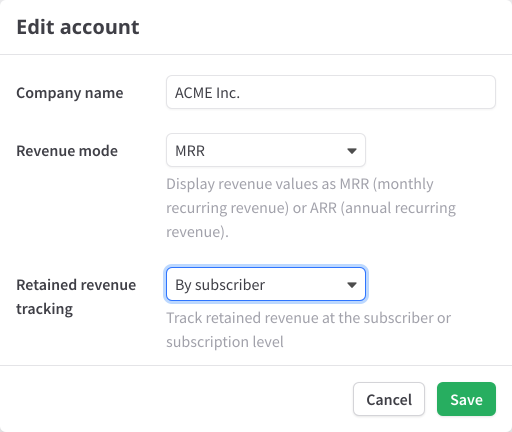
Changing the setting only affects payments recorded after the change.
Subscription comebacks after cancellation
Sometimes subscribers resume a subscription soon after canceling. If a subscriber comes back within the comeback window, their payments continue to count as saved revenue, credited to the offer they accepted before canceling. If they come back later, their payments only count as saved again once they accept another retention offer.
The window is one billing period, up to 31 days, from when the subscription ends (not when cancellation was requested). Starting a new subscription, reactivating the old one or making a payment all count as coming back.
With By subscriber, this only applies once the subscriber has canceled all of their subscriptions. A paused or trialing subscription still counts as active.
With By subscription, the window begins as soon as the saved subscription ends, even if the subscriber has others. On Stripe, Recurly, Braintree, Paddle, OpenPay and Piano, a subscription can't restart once it ends, so with By subscription, a save doesn't carry over to a subscriber who comes back.
Deflected revenue
A payment counts as deflected when all of these are true:
- The subscription had at least one cancellation session before the payment, finished or not.
- None of those sessions ended in a cancellation or a save.
- The payment doesn't count as saved, or toward a reactivation, conversion or payment recovery offer.
When the payment comes in, unfinished sessions on the subscription are marked as deflected.
Deflected revenue is always tracked by subscription. Once a cancellation session on that subscription ends in a cancellation or a save, its payments no longer count as deflected, even after another session.
Comebacks don't apply to deflected revenue: it stops when the subscription ends and only starts again after another session on it. The exception is a subscription canceled over an unpaid charge. If it's paid again within one billing period, up to 31 days, its payments keep counting as deflected. On Bold, Naviga, Recurly Commerce, Skio, Stay AI, Sticky.io and Submarine, unpaid charges aren't recorded, so this exception doesn't apply. On Stripe, Recurly, Braintree, Paddle, OpenPay and Piano, a subscription can't restart once it ends, so a subscriber who comes back gets a new subscription, where their earlier sessions don't count.
Refunds and report dates
A refund of a saved or deflected payment is subtracted from that revenue. Reports place each payment on the date it was paid and each refund on the date it was issued.