When offers are not shown
There are a number of reasons why an offer might not be presented during a cancellation session. The most common are:
- The customer did not match an offer rule, either because the customer isn't in the rule's segment or didn't give a required answer
- The customer matched a rule with Present no offer selected
- The customer had previously accepted an offer in ProsperStack, unless Allow override was enabled
- The offer had an unmet offer-specific condition, as described below
- The offer was included in the flow embed's
skipOffersoption
Troubleshooting
Session details can help diagnose why an offer was not presented.
Click Sessions in the left navigation and then click a subscriber's name or email in the sessions grid to view session details.

The Offers field in the Details card displays all offers which were presented during the session.
If "No offers" is shown it indicates that either: no rule matched or the rule was configured to present no offer. Check the Properties card to view platform and custom properties at the time of the session.
If an offer badge is shown with a strikethrough, that indicates a rule matched but the specific offer could not be displayed. Hover over the badge to see why the offer was not presented.
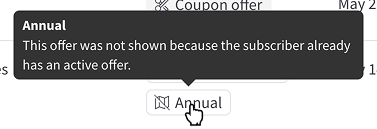
Offer-specific conditions
Offer-specific conditions are automatic eligibility checks made before presenting an offer, based on offer type/settings and the current state of the customer and subscription. For example, a trial extension can only be presented to a subscription that is on trial (unless the offer is configured to allow extensions without an active trial).
This is in contrast with offer rules. Rule conditions determine if a customer matches the rule, while offer-specific conditions determine whether an offer can actually be shown to that customer.
During rule evaluation, offers that fail these conditions are removed from consideration. If no offers remain in the matching rule, no offer is presented and evaluation stops.
In an offer group, if any offer in the group fails its conditions, the whole group is excluded.
Some checks apply only to particular subscription platforms. Available offer types also vary by platform.
Coupon
A coupon offer is excluded when:
- The subscription is canceled.
- The subscription (or customer, in the case of Stripe) already has an active coupon and Replace coupons is not enabled for the offer.
- The selected coupon is no longer valid.
- A coupon limited to specific product groups, products, plans or add-ons does not apply to the subscription.
- On Chargebee, the subscription is paused.
- On a legacy Sticky.io subscription, the offer uses a fixed amount coupon.
Change plan
A change plan offer is excluded when:
- The subscription is canceled, contains multiple plans or is already on the destination plan.
- The offer includes an additional coupon that fails any applicable coupon condition.
- On Chargebee, the subscription is paused or has not started yet.
- On Paddle, the subscription is on trial, paused or past due.
- On Recurly, the customer has another active subscription on the destination plan.
- On Sticky.io, one plan uses the legacy plan format and the other uses the current plan format.
Modify subscription
Each configured plan and add-on change is evaluated against the current subscription. The offer is excluded when none of the changes are applicable, or when the applicable changes would remove every plan without adding another one.
A configured change is not applicable when it would:
- Add a plan/add-on the subscription already has.
- Remove a plan/add-on the subscription does not have.
- On OpenPay, add a plan with a different billing interval or interval count.
- On Recurly, add an add-on that is not compatible with any plan on the subscription.
The entire offer is also excluded when the subscription is canceled or, on Chargebee, when it is paused or has not started yet.
Pause subscription
A pause subscription offer is excluded when:
- The subscription is already paused or is on trial.
- The subscription has not started yet.
- On Naviga, the subscription is not allowed to be paused.
- On Recurly, the subscription is past due, the customer has past due invoices, or the subscription is set not to renew at the end of the current period.
- On Stripe, the offer resets or extends the billing date using a subscription schedule, but the subscription already has a schedule.
Trial extension
By default, a trial extension offer is excluded when the subscription is not on trial. Enabling Allow without active trial removes this condition. On Stripe, a paused subscription remains ineligible even when that setting is enabled.
Product swap
A product swap offer is excluded when the subscription is canceled or contains multiple plans. On Bold, the current plan must also have swappable products, and every product in a swap limited to specific products must be allowed for that plan.
Change frequency
A change frequency offer is excluded when the subscription is canceled.
Free/discounted gift
A free/discounted gift offer is excluded when the subscription is canceled.
Upgrade
An upgrade offer is excluded when:
- The subscription is canceled, contains multiple plans or is already on the destination plan.
- On Piano, the destination plan is not one of the subscription's eligible upgrade plans.
Downgrade
A downgrade offer is excluded when the subscription is canceled, contains multiple plans or is already on the destination plan.
Reactivate
A reactivate offer is excluded unless the subscription is canceled. It is also excluded when the subscription contains multiple plans or, on platforms other than Braintree, when the customer already has an active subscription on any of the same plans.
Payment recovery
A payment recovery offer is excluded when the subscription is canceled or contains multiple plans.
Offer types without additional conditions
Custom, Purchase and Reschedule order offers have no conditions specific to their offer type, but they may still be excluded for one of the other reasons described above.
Autopilot offers
For Autopilot offers with the Forecasted value discount strategy, the subscription plan must have a monthly-equivalent billing interval.